
Find your answer. Get back to studying.
Quick, current answers about memberships, logins, the QBank, practice exams, billing, gifts, and getting the most from Smarty PANCE.
Which login do you need? Smarty PANCE has three access surfaces: the main course website, the QBank, and the member community. They may use separate credentials, so a login that works in one place may not work in another.
28 answers available
Getting started & account access
Membership access, redirects, credentials, and passwords.
What is included with a Smarty PANCE membership?
Every all-access membership includes the PANCE, PANRE, PANRE-LA, EOR, and EOC study courses; practice exams with unlimited retakes; and full access to the Smarty PANCE QBank. You also receive the interactive blueprint lessons, flashcards, selected audio and video review resources, and the member community.
Some embedded third-party libraries have their own licensing or upgrade requirements. “Integration” does not always mean full premium access to the partner’s entire library. See the third-party tools FAQ below or compare the current options on the membership page.
What can I do from My Account?
Open My Account while signed in to see your membership status and expiration date, purchase discounted extensions, manage your display name and password, check Picmonic or ReelDx access, and open QBank, blueprints, the community, or these FAQs.
When a Stripe customer record is connected to your membership, My Account also provides secure billing access and available purchase receipts. Older, gifted, complimentary, and institutional access may not have an online Stripe receipt; contact support if you need help locating one.
I paid, so why am I being redirected to the Join Now page?
A redirect usually means the site cannot confirm access to that resource. Try these checks:
- Confirm that you are logged in with the email used at checkout
- Confirm that your access pass is still active
- If you purchased one stand-alone course, remember that it does not unlock every membership resource
- If the link opens the QBank, use your separate QBank credentials
If the redirect continues, contact support and include the URL of the page you were trying to open.
Why doesn’t my Smarty PANCE login work in the QBank?
The QBank has a separate login, and your QBank username is the email address used when that account was activated. If you joined with a school email or a different purchase email, that may be the address the QBank recognizes—even if you now use another email on the main website.
New members receive an invitation email with a registration link and access instructions after joining. Check spam, junk, promotions, and any other email address you may have used at checkout.
If the QBank says your email cannot be found, you joined before the QBank launched, or the invitation never arrived, email [email protected] with the subject “Need QBank access.” Include your Smarty PANCE username and purchase email, but never your password. Older accounts may need an access review rather than another password reset. Learn more in the QBank guide.
How do I reset my password?
Main Smarty PANCE website: Go to the login page, choose “Lost your password?”, and follow the email instructions.
QBank: Go to exams.smartypance.com and choose “Forgot Password.” Because the logins are separate, resetting one password does not reset the other.
No reset email? Check spam or junk, add [email protected] to your trusted contacts, and make sure a password manager is not filling an old password.
I renewed Smarty PANCE, so why does the QBank still say expired or denied?
The main website and QBank are separate systems. A successful renewal on smartypance.com may not immediately resolve an expired, denied, or unrecognized QBank account.
First, confirm that your main membership works and that you are using your separate QBank login. If the QBank still shows an access error, do not purchase again. Email [email protected] with the exact error plus your Smarty PANCE username, purchase email, or receipt number so we can match the correct account. Never send your password.
Can I share or transfer my membership to someone else?
No. Smarty PANCE memberships and QBank accounts are licensed for individual use and cannot be shared or transferred. Each member needs a separate account so access, exam attempts, analytics, and progress stay connected to the correct person.
If your school, cohort, or study group needs multiple accounts, use a group or institutional option so every participant receives individual access. Support will not move QBank access to a different person’s account.
QBank & practice exams
Finding exams, saving progress, custom practice, and mobile access.
Where do I find the QBank and prebuilt exams?
Open the QBank directly at exams.smartypance.com. After you sign in, choose Content from the top navigation. From the Smarty PANCE content page, you can find system-specific exams, 225-question exams, EOR exams, mock exams, and other prebuilt options.
You can also open the QBank from the Member Launchpad by clicking your username and choosing “QBank Login.”
Can I pause an exam and resume it later?
In the QBank, yes. Responses save automatically. Click “Pause,” then return to the Attempts section to resume an in-progress exam or review a completed one.
In the original Smarty PANCE exams, no. Those attempts are stored only in your current browser session and should be completed in one sitting. Leaving or refreshing the page may erase your progress.
Can I build a custom exam or target my weak areas?
Yes. In the QBank’s Custom Practice Mode, choose the blueprint category, organ system, topic, difficulty, and number of questions. The analytics dashboard tracks performance by system and topic so you can identify weak areas and create focused follow-up sessions.
Can I use the QBank on my phone or tablet?
Yes. The QBank works on desktop, tablet, and mobile browsers. You can also add it to your phone’s home screen like an app—no app-store download is required. Open exams.smartypance.com in Safari or Chrome, use the browser’s Share menu, and choose “Add to Home Screen.”
See the mobile setup guide for a walkthrough.
Membership & billing
Plan changes, refunds, receipts, and group options.
Can I change plans or extend my membership?
Existing members can choose discounted two-week, three-month, or one-year options on the renewal and extension page. Log in to your existing main-site account before purchasing so the added time attaches to that account. If time remains on your membership, the extension is added to it—you do not lose time you already purchased.
You can choose the same discounted options directly from My Account, where you can also check your expiration date and manage your profile. If the plan you need is not listed, contact support.
Can I purchase Smarty PANCE as a gift?
Yes. Use the Smarty PANCE gift checkout for a one-year membership, or choose the Smarty PANCE + ReelDx gift. Current members can use the member gift checkout, where the $10 member discount is applied automatically.
After payment, the purchaser receives a receipt and a personalized digital gift-card page that can be downloaded, printed, or emailed. The unique redemption code does not expire, the recipient is never charged, and the 12-month membership begins when the code is redeemed—not when the gift is purchased.
Does my Smarty PANCE membership renew automatically?
Current standard Smarty PANCE all-access passes are fixed-term memberships, not automatic renewals. Your access ends at the close of the period you purchased, so there is normally nothing to cancel and you will not be charged again unless you choose to renew or extend.
If a checkout page or receipt specifically describes a recurring product, those displayed terms control. If you see an unexpected pending or posted charge, contact support with the purchase email and receipt number. Please do not send card details.
I see two Smarty PANCE charges. What should I do?
First, check whether both charges are fully posted; a temporary pending authorization may disappear without becoming a completed charge. Also consider whether a second purchase was made with another email address.
If both charges post, contact support before purchasing again or opening a dispute. Include the purchase email, charge dates and amounts, and any receipts so we can locate both transactions. Do not send your full card number. If we confirm a duplicate completed payment, we will explain the resolution and refund timing.
Are Picmonic, Osmosis, and ReelDx included with my membership?
These are third-party learning tools integrated into selected Smarty PANCE lessons, but their premium access works differently:
- Picmonic: Integrated lesson links and samples are available, while the complete videos, quizzes, and Picmonic premium library require the Picmonic upgrade
- Osmosis: Smarty PANCE lessons link to relevant Osmosis content, but a full Osmosis Prime membership is separate; members can use the Smarty PANCE discount
- ReelDx: Full integrated patient-video access requires a membership or upgrade that specifically includes ReelDx; it does not provide separate ReelDx.com credentials
What is the Smarty PANCE refund policy?
If you are unsatisfied for any reason, you may request a full refund within 60 days of purchase. If you do not pass the PANCE or PANRE, you may request a refund for up to one year after purchase or choose a complimentary 12-month extension instead.
Review the complete terms and submit a request on the Refund Policy page.
How do I get a purchase receipt?
Stripe emails a receipt to the address used at checkout. Search your inbox and spam folder for the purchase confirmation. If you need another copy or specific documentation for employer reimbursement, email [email protected] with the name and email used for the purchase.
Do you offer military, group, or institutional pricing?
Yes. Smarty PANCE offers a dedicated military discount, plus options for student-led groups, institutional purchases, and gift certificates. Visit the membership page for current options or review institutional pricing.
Group access does not mean a shared login. After the purchase is arranged, the coordinator receives setup instructions so each participant can create an individual Smarty PANCE account with their own progress and QBank access. Contact us with the approximate group size, preferred membership, and whether the purchase is student-led or program-paid.
Studying & resources
Suggested workflows, CME, and exam-day references.
What is the best way to use Smarty PANCE for the PANCE or PANRE?
- Start with the interactive exam blueprint so your study plan follows the tested content
- Review each system’s PEARLS, then open the full lessons when you need more depth
- Use QBank Custom Practice Mode to apply what you learned and identify weak areas
- Revisit missed topics using linked lessons, notes, flashcards, and focused question sets
- Finish with timed mock exams to build pacing and endurance
For a complete workflow, see How to Study for the PANCE Using Smarty PANCE.
How should I use Smarty PANCE for an EOR or EOC exam?
Begin with the appropriate EOR or EOC topic list. Use each course’s PEARLS as a high-yield pass, open the linked blueprint lessons for deeper review, complete the flashcards and quizzes, and finish with the matching practice exams. In the QBank, you can use prebuilt EOR exams or create a custom exam by rotation, system, topic, and difficulty.
See the step-by-step EOR and EOC study guide.
Should I use the current or legacy EOR course?
Use the blueprint and exam version specified by your PA program. Smarty PANCE is rolling out the 2026 EOR blueprint updates rotation by rotation, and completed sections appear inside each course as they are released. Earlier material remains useful for review, but the organization and weighting may differ from the current topic list.
Some legacy resources remain available for cohorts whose programs still administer an older exam, including the retired General Surgery EOR resources. If you cannot find the version your program uses, contact support with your rotation, exam date, and program’s stated blueprint—without sending any secure exam content.
Which EOR courses are available, and what happened to Surgery and Women’s Health?
Smarty PANCE covers the six active PAEA End of Rotation exams: Emergency Medicine, Family Medicine, Internal Medicine, Pediatrics, Psychiatry and Behavioral Health, and Gynecologic, Sexual and Reproductive Health (GSR).
GSR is the updated exam name and blueprint; older Women’s Health material may remain available as a legacy view. PAEA retired General Surgery as an active EOR exam, but Smarty PANCE keeps its General Surgery course, topic list, practice exam, and QBank material as legacy study resources. The EOC course is separate from the six rotation exams.
See the current EOR course and practice-exam overview. Smarty PANCE independently organizes its educational content around published PAEA blueprints and is not sponsored, endorsed by, or affiliated with PAEA.
Can I use Smarty PANCE or an AI-enabled resource during PANRE-LA?
PANRE-LA permits printed and online reference materials, but NCCPA exam-security rules still apply. NCCPA currently permits online resources that incorporate AI when you search with discrete clinical keywords. You must not type, paste, dictate, screenshot, or upload an intact question, answer choices, rationale, or substantial portions of them into any website, search engine, or chatbot.
You must work independently and never share PANRE-LA exam content. Use the member-only PANRE-LA Rapid Blueprint Search with short clinical keywords—not copied question text—and review the current NCCPA PANRE-LA agreement before each exam period because NCCPA’s rules control and may change.
Does Smarty PANCE provide CME credit?
Smarty PANCE is not an accredited Category 1 CME provider and does not issue Category 1 CME certificates. NCCPA states that medically related educational activity that has not been designated for Category 1 may qualify for Category 2 credit. You may be able to log your actual self-study time on an hour-for-hour basis.
Always verify the current NCCPA CME requirements and any separate requirements from your state licensing board.
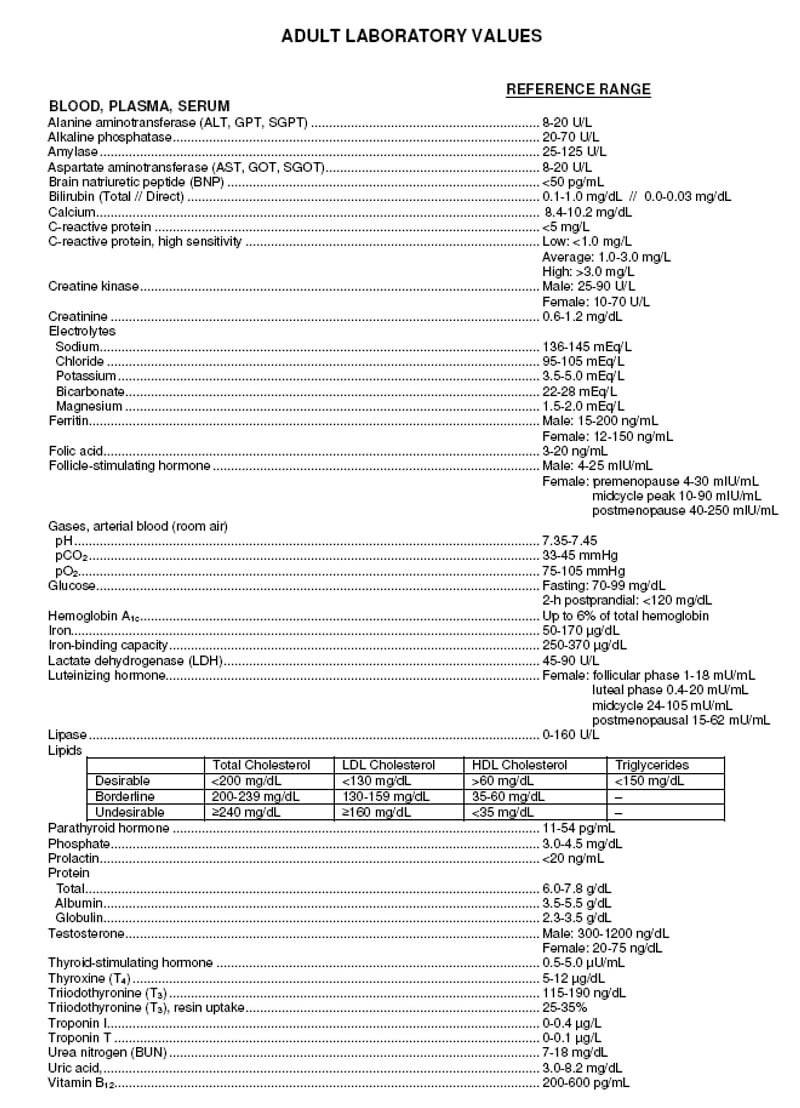
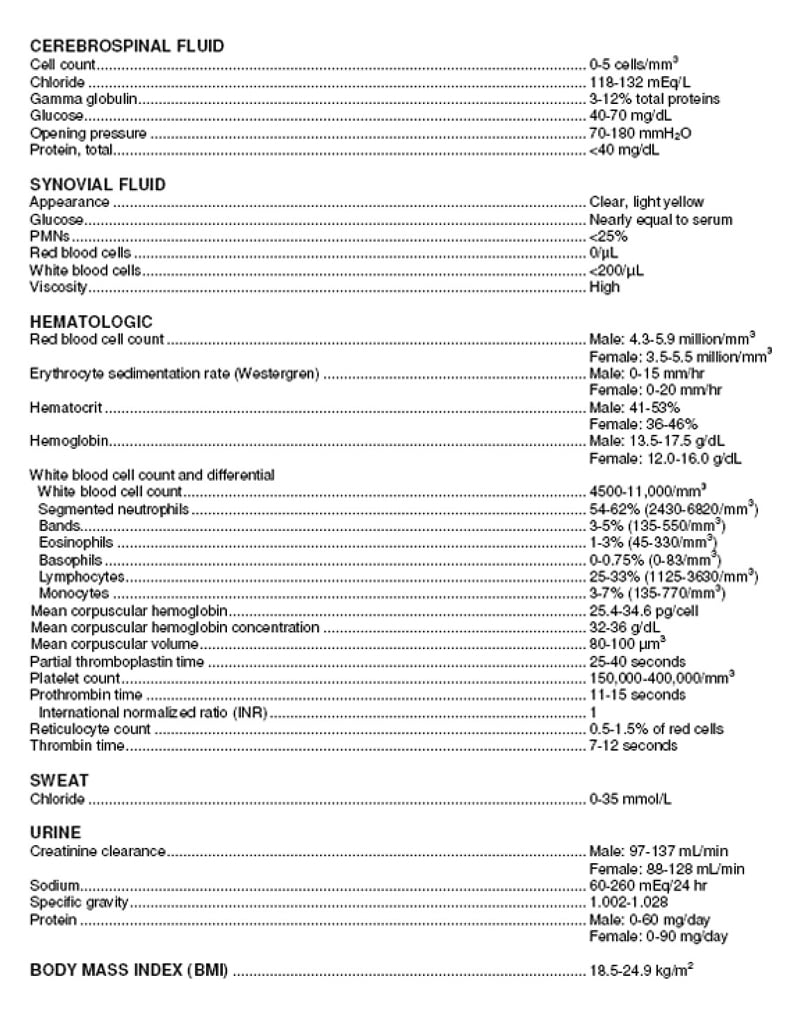
Where can I find the PANCE/PANRE lab values?
Lab-value reference links appear in the footer of every Smarty PANCE page: Lab Values Page 1 and Lab Values Page 2. The QBank’s Virtual PANCE/PANRE simulations also include lab values as part of the exam experience.
Troubleshooting & support
Fast fixes and the information that helps us help you.
A page, video, or QBank feature is not loading. What should I try?
- Confirm that your internet connection is stable and that you are using the correct login
- Refresh the page, then try a current version of Chrome, Safari, Firefox, or Edge
- Try a private/incognito window to rule out an extension or saved-login conflict
- If needed, clear site cache and cookies, then sign in again
Important: Do not clear browser data or refresh while taking an original Smarty PANCE exam. Those exams do not autosave and your current attempt may be lost.
How do I report a question error or ask for help?
Use the report option inside the QBank when available, or send a support request. Include the question or page title, the URL, what you expected to happen, and a screenshot if it helps explain the issue.
For account matching, include your Smarty PANCE username, the email used for purchase, or a receipt number—whichever is easiest. Never send a password or full card information. You can also email [email protected].
Still need a hand?
Tell us what you were trying to access and what happened. A page URL or screenshot helps us solve most issues faster.